---
url: 'https://1jichang.com/clients/clash-party.md'
description: Clash Party 使用教程，基于Mihomo核心的新一代网络代理工具，界面简介清晰，功能强大。支持所有主要桌面操作系统，能广泛满足不同用户的需求。
---
# Clash Party 使用教程

> **2026年更新：** 本文整理 Clash Party 的下载、使用教程、机场订阅导入与节点配置，并覆盖 VPN 客户端、翻墙软件和科学上网客户端的相关使用场景。

**Clash Party** 是一款简单易用的基于 Clash Meta（Mihomo）核心的科学上网客户端。自 Clash for Windows 删库之后，又出现了很多 Clash 客户端。但相比之下，我觉得 **Clash Party** 是对新手很友好的。

## Clash Party 客户端下载 {#clash-party-download}

<CardGrid>
<LinkCard title="Clash Party" description="基于Mihomo核心的新一代网络代理工具，界面简介清晰，功能强大。支持所有主要桌面操作系统，能广泛满足不同用户的需求。 · 访问下载页" href="https://github.com/mihomo-party-org/clash-party/releases" icon="https://i.eoht.net/logo/clash-party.webp" target="_blank" rel="noreferrer nofollow" />
</CardGrid>

## Clash Party 添加订阅教程 {#clash-party-subscription-setup}

### 获取订阅地址 {#clash-party-get-subscription-url}

<CardGrid>
<LinkCard title="VPN机场套餐与价格比较" description="按价格、流量和套餐类型初筛，再进入详情核对线路、解锁与优惠。 · 比较机场套餐" href="/airports#vpn-airport-plan-comparison" />
</CardGrid>

登录机场官网后台，复制 **订阅链接**。
⚠️ 建议**关闭浏览器自动翻译功能**，避免订阅链接被错误处理。

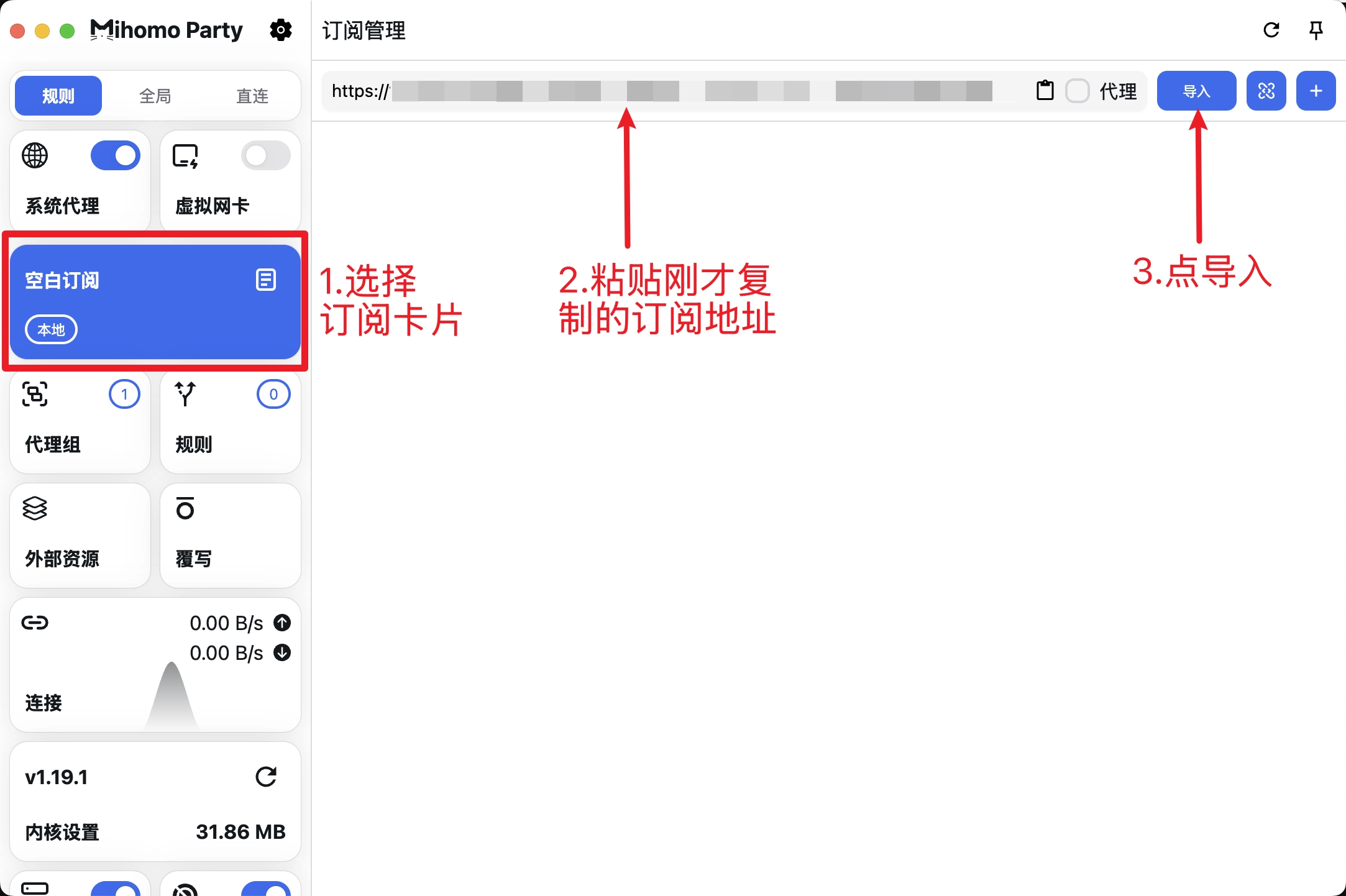
### 导入订阅 {#clash-party-import-subscription}

**启动 Clash Party 后：**

* 进入配置或订阅管理页面
* 粘贴你的机场订阅链接
* 确认导入

![导入订阅](https://i.eoht.net/docs/20260102143014522.webp)

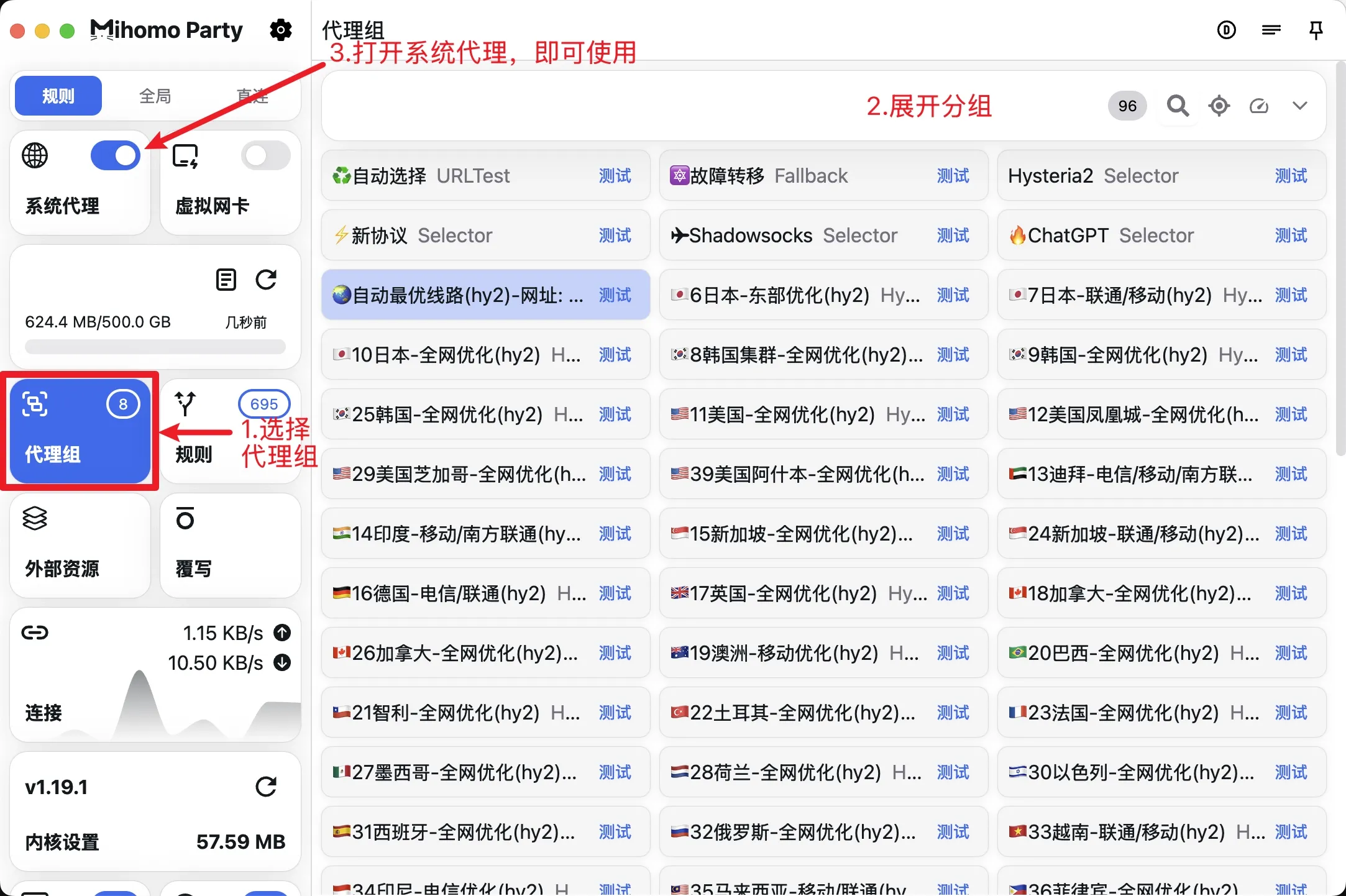
### 选择节点开启代理 {#clash-party-select-node-and-connect}

订阅导入成功后：

1. 进入 **节点 / Proxies**
2. 选择需要使用的节点（如 🇭🇰 香港 / 🇸🇬 新加坡 / 🇺🇸 美国）
3. 确认节点生效

![选择节点开启代理](https://i.eoht.net/docs/20260105120039905.webp)

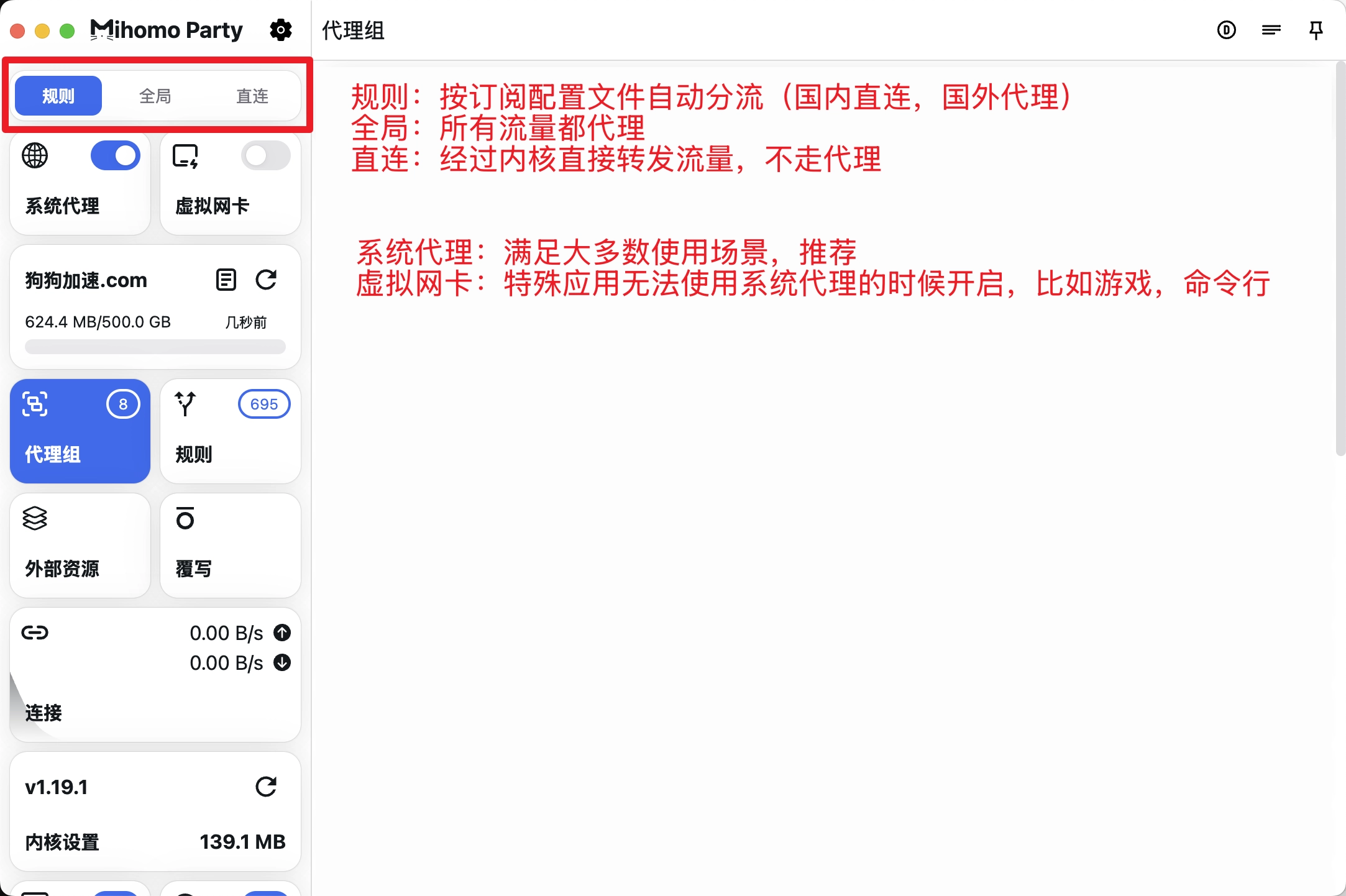
### 模式选择 {#clash-party-select-mode}

根据使用场景选择合适的模式：

* **规则模式（Rule）**：推荐日常使用
* **全局模式（Global）**：所有流量走代理
* **直连模式（Direct）**：不使用代理

![模式选择](https://i.eoht.net/docs/20260102143037110.webp)

## 使用建议 {#clash-party-usage-tips}

* 📌 日常浏览与软件使用：**规则模式**
* 🚀 访问海外服务异常：尝试切换节点
* 🔄 节点失效或延迟高：更新订阅或更换线路
* ⚡ 优先选择低延迟、低丢包节点

<section data-related-content>
  <h2 id="related-content">相关内容</h2>
  <CardGrid>
    <LinkCard data-related-category="airport" title="一翻云(1fly)机场详情" description="继续阅读相关内容" href="/airports/1fly" />
    <LinkCard data-related-category="airport" title="Sogo云机场详情" description="继续阅读相关内容" href="/airports/sogo" />
    <LinkCard data-related-category="ai" title="AI 使用教程汇总｜ChatGPT、Gemini 新手入门与国内使用指南" description="继续阅读相关内容" href="/ai" />
    <LinkCard data-related-category="sharing" title="账号星球（Accountboy）商品与价格：海外账号、流媒体和 AI 服务" description="继续阅读相关内容" href="/sharing/acc" />
    <LinkCard data-related-category="code" title="Hero SMS - 国外接码平台" description="继续阅读相关内容" href="/sms" />
    <LinkCard data-related-category="context" title="FlClash 使用教程：客户端下载、订阅导入与系统代理设置" description="继续阅读相关内容" href="/clients/flclash" />
  </CardGrid>
</section>